


ILLUMINATOR Hybrid-LCD
4.150.00 Reviews
App Specs
- Version
- Varies with Device
- Updated On
- License
- $2.49
- Downloads
- 10,000+
- Developer
- WatchBase
- Categories
- Personalization
- Platform
- Android
Screenshots
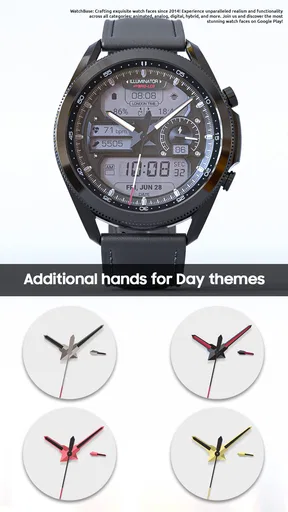
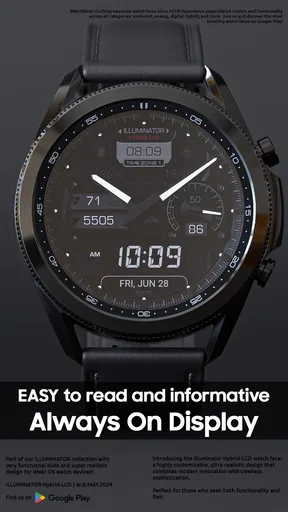
 Analysis by AppCompare
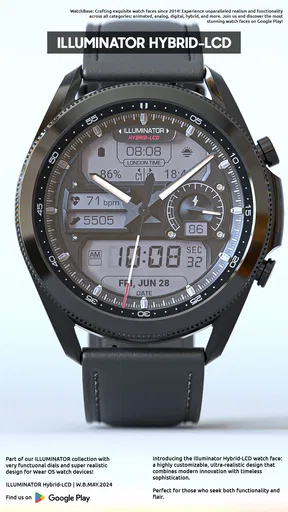
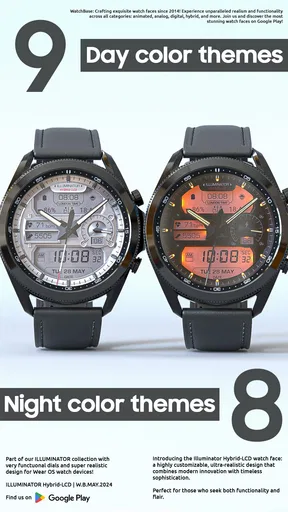
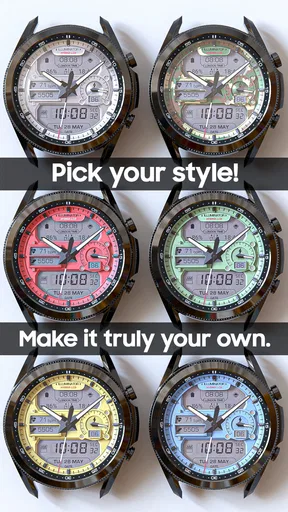
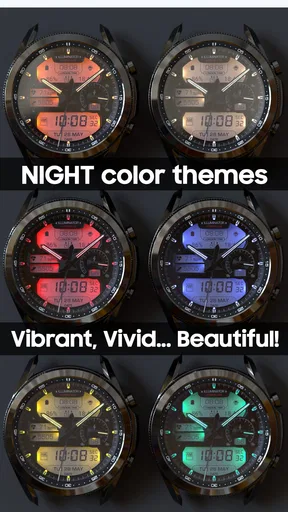
I judge a watch face less by its first impression than by whether I can read it quickly and still enjoy looking at it days later. ILLUMINATOR Hybrid-LCD is a personalization app from WatchBase built around a hybrid LCD look, with a detailed, realistic style and room to customize the result. It is a paid option at $1.99, so I’d approach it as a considered choice for someone who wants a particular watch-face aesthetic rather than a free, throwaway experiment.
A good fit for a specific kind of watch wearer
The appeal here is the combination of a digital-feeling LCD presentation and the visual character of a more substantial watch design. If you like a face that looks technical and deliberately detailed, this has a clearer identity than a plain digital display. If you prefer a clean dial with only the time, or a minimal face that disappears into the background, the hybrid style may feel busier than you want.
I’d put it on a watch I wear through ordinary routines: checking the time while walking, glancing down during a commute, or looking at my wrist while carrying groceries. A face has to work at a glance in those moments, not just look impressive when I stop to inspect it. The practical test is whether the layout remains easy to scan after customization, especially when I’m moving or the display is not directly in front of me.
Start with the view you actually need
My suggested baseline is simple: install the face, look at it at normal wrist distance, and decide what catches your eye first. Then adjust the available design options one at a time rather than changing everything at once. That makes it easier to tell whether a choice genuinely improves readability or merely looks appealing in a setup screen.
Try this in the places where you normally check your watch: indoors, outside, and under the lighting you encounter during the day. A face that looks crisp while you are sitting still may not be as comfortable to read in motion. This is especially useful with a detailed LCD-inspired design, where strong visual character is part of the point but can compete with quick time-reading if the overall look feels too busy.
Customization with a purpose
The best reason to spend time personalizing a watch face is to make it fit your routine, not to use every option just because it is available. I’d begin with the overall appearance that drew me to this design, then check which adjustments make the time stand out more clearly. A restrained setup is often easier to read throughout a long day than one that tries to make every element equally prominent.
That also gives you a useful way to decide whether the face is for you. If you find yourself repeatedly changing the look in search of a calmer, simpler display, the style itself may not match your taste. If a small adjustment makes it feel more personal while keeping the central read clear, that’s a good sign you’ve found a setting worth keeping.
Worth Reading Before You Choose

Flipboard Shows What News Apps Must Do Beyond the Feed

Switching to Android Auto Means Rethinking Your Driving Routine

Google Calendar Makes a Crowded Week Easier to Manage

Ludo King Makes the Most of the Minutes Between Plans

Baby Panda World Brings Quick Play to Modern Phones, but Its Game Library Feels Busy

ESPN’s Live Game View Makes Following Close Games Easier
How it compares with simpler alternatives
Many watch faces in personalization apps lean toward either a plain digital layout or a traditional-looking dial. This one sits between those familiar choices: its hybrid LCD character gives it a more distinctive visual identity than a basic time display, while its realistic design aims for more presence than a bare utility face. That makes it appealing if you want your watch to look intentionally styled, not just functional.
The trade-off is that a highly designed face is not automatically the best everyday choice for everyone. A basic digital face can be easier to read at a glance, and a minimal option may suit someone who wants less visual detail. I would choose ILLUMINATOR for its particular look, not because it must outperform every other face at simplicity.
Small habits that make the choice easier
I’d give the face a few normal days rather than deciding from a quick preview. Notice whether you naturally look at the time without having to focus, and whether the design still feels appealing after the novelty wears off. If you use different watch faces for work and leisure, compare this one with your usual choice during the same sort of day; that makes the difference in visual density easier to judge.
Another helpful habit is to avoid adjusting the face right before you need to rely on it. Make a change when you have a moment to look at the result, then leave it in place long enough to see how it works in everyday conditions. That keeps customization from becoming a distracting loop and gives you a fair sense of whether the look is comfortable to live with.
Lighting Up More Than Just Your World
First things first, the core function of ILLUMINATOR Hybrid-LCD is, of course, to provide you with light. But it does so with a twist. This app utilizes a hybrid technology that combines both your phone’s LED light and the screen. This means you get a super bright flashlight, perfect for those nights when you’re fumbling with your keys at the door. I’ve got to say, I was impressed by how well it lit up my backyard during a late-night barbecue.
Features Worth Noting
Now, let’s talk features because this app has them in spades. One thing that caught my attention is the strobe light feature. You can adjust the speed and frequency, making it a great tool for emergencies or, you know, your next impromptu dance party. It’s super easy to use, and the interface is intuitive, so you won’t be left scratching your head trying to figure it out.
Another cool feature is the SOS signal mode, which is a must-have for any outdoor adventure enthusiast. With just a tap, you can send out a distress signal in Morse code. It’s a comforting thought knowing you’ve got a potentially life-saving tool in your pocket.
Usability and Design
When it comes to design, ILLUMINATOR Hybrid-LCD keeps it simple and user-friendly. The app’s layout is clean, and everything is laid out in a way that just makes sense. You won’t find yourself lost in a sea of tabs and menus. It’s straightforward, which is exactly what you want in an app that might be used in high-pressure situations.
One of my favorite parts about the app is its customization. You can tweak the color of the screen light, which might seem like a small detail, but it adds a fun, personal touch to the app. Plus, the battery-saving mode is a brilliant addition, ensuring you won’t drain your battery when you need it most.
Real-World Application
So, how does ILLUMINATOR Hybrid-LCD fare in real-world scenarios? Pretty darn well, in my experience. Whether I used it to find my cat under the bed or as a makeshift reading light during a power outage, it performed without a hitch. The hybrid function is genuinely handy, and the light output is impressive.
One evening, I used the app during a camping trip, and it quickly became a group favorite. The strobe light added to the campfire storytelling atmosphere, and the SOS feature was reassuring to have while we were deep in the woods.
Final Thoughts
To wrap it up, ILLUMINATOR Hybrid-LCD is not just another flashlight app. It’s a versatile tool that goes beyond basic lighting needs, offering a suite of features that can be both fun and functional. Whether you’re using it for a practical purpose or just to add some flair to your evening, it’s a reliable companion.
If you’re looking for a flashlight app that’s a bit more dynamic than the usual fare, give this one a shot. It’s free to download, so why not try it out? You might just find it comes in handy more often than you think.
Who should consider it—and who should pass
I’d recommend this watch face to people who enjoy customizing their watch and want a hybrid LCD look with a strong, realistic presence. It is also a sensible choice for someone who likes trying a design in daily life rather than treating the watch as a blank screen. WatchBase’s face has an average rating of 4.1 from around 600 ratings, which gives shoppers a useful broad impression, though personal taste matters more than a rating when the choice is this visual.
I’d skip it if your priority is the simplest possible display, or if you prefer to change faces often and only want free options. At $1.99, it is a modest paid purchase, but still worth considering against the faces you already use. It is rated for Everyone and has over 10,000 installs, so it is a broadly accessible personalization pick, not a specialist tool that requires a particular lifestyle.
Practical questions before settling in
If you are wondering whether it is meant for an everyday watch, I think that depends on how quickly its design reads for you. Try it during a normal day rather than judging only by the preview. If the time is easy to spot while you are busy, the distinctive look can work as an everyday choice; if you keep pausing to interpret the screen, a simpler face is likely better.
If your main concern is whether customization will make it feel personal, the useful approach is to make small changes and compare them in actual use. Avoid treating the settings as a checklist. Keep the choices that improve the look or readability, and undo anything that adds visual noise. This is a more reliable way to find a comfortable setup than continually chasing a perfect screenshot.
For buyers comparing alternatives, the key question is whether they want this specific hybrid LCD character. A standard digital face may offer a more direct read, while a minimal face is a better match for an understated wrist. I see this design as the middle ground for someone who wants personality without choosing a wholly traditional presentation. It does not need to suit every wearer to be a worthwhile choice for the right one.
My verdict after weighing the trade-offs
ILLUMINATOR Hybrid-LCD makes sense when its visual style is the reason you are shopping. Its appeal lies in a realistic hybrid look and customization that lets you shape the result, while the main consideration is whether that detailed appearance stays comfortable to read in your own routine. I would take a little time to test it at a glance before deciding it has earned a permanent place on my watch.
WatchBase released it on May 17, 2024, and the face is a focused personalization purchase rather than a universal recommendation. If you enjoy a distinctive LCD-inspired design and are willing to tune it to your taste, it is worth considering. If you want the quietest, clearest possible screen or do not want to pay for a watch face, choose a simpler alternative instead. That is the honest dividing line: buy it for the look you will enjoy wearing, not for the assumption that more visual detail is always better.
Pros
- Bright and clear display in all lighting.
- Long battery life enhances usability.
- User-friendly interface simplifies use.
- Compact design for easy portability.
- Versatile connectivity options available.
Cons
- Limited app integrations with system.
- Initial setup can be slightly complex.
- Higher price compared to competitors.
- Occasional software updates needed.
- Lacks offline functionality for some features.
FAQs for ILLUMINATOR Hybrid-LCD
What features does the ILLUMINATOR Hybrid-LCD app offer?
The ILLUMINATOR Hybrid-LCD app provides users with advanced customization options for their hybrid LCD screens. Features include adjustable brightness settings, a variety of display themes, and an intuitive interface for seamless navigation. Additionally, the app offers real-time updates and compatibility with various devices, making it a versatile solution for enhancing your screen experience.
Is the ILLUMINATOR Hybrid-LCD app compatible with all devices?
The app is designed to be compatible with a wide range of Android and iOS devices. However, it is important to check the specific system requirements on the app's download page to ensure that your device meets the necessary specifications for optimal performance. Compatibility may vary based on the device model and operating system version.
Does the app consume a lot of battery power?
The ILLUMINATOR Hybrid-LCD app is optimized to minimize battery consumption while providing enhanced display features. Users can adjust settings to further reduce power usage, such as lowering brightness or disabling certain features when not needed. Despite its functionality, it maintains a balance to ensure it doesn't excessively drain your battery.
Are there in-app purchases or advertisements?
The app offers a free version with basic features and may include advertisements. However, users have the option to upgrade to a premium version that provides an ad-free experience and unlocks additional features. This allows users to choose between a cost-effective or enhanced premium experience based on their preferences.
How user-friendly is the ILLUMINATOR Hybrid-LCD app?
The app is designed with a user-friendly interface that caters to both tech-savvy users and beginners. It offers straightforward navigation, clear instructions, and helpful tips to guide users through customization options. With its intuitive design, users can easily adjust settings to personalize their LCD display without any hassle.


